
SAST in depth: engines, taint and limits
In the introduction, we stayed at the counter: an over-obedient barista, a drop of ink, a game.
Here we go into the kitchen, and it is going to smell of engine oil.
Run three SAST tools on the same repositoryrepository: where a project's code lives, with its history, for example on GitHub: you will get three different lists. That is the subject of this article: what each engine builds from the code, what it follows, what slips past it, and why none will ever be perfect. It builds on SAST explained simply, but stands on its own.
Optional refresher: an SQL injection step by step, with a demo to try
In a real application, the counter is the databasedatabase: the software that stores and retrieves the application's information: customers, invoices…, and the sentence called out is written in a language called SQL.
Here is a fictional invoice portal with three customers. First click MARTIN to see normal use, then click ' OR '1'='1: that is the trick an attacker would type instead of a name (OR means "or").
Look at what the program sends to the database: what you typed is highlighted.
Invoice portal · fictional example
Try:
What the program sends to the database
SELECT * FROM invoices WHERE customer = 'MARTIN'Result
- No. 101MARTIN€120
1 invoice: Martin's. That is the intended use.
Here is the same question, colored by who wrote each part:
customer = '' OR '1'='1'
written by the programtyped by the attacker
- The attacker starts with a quote to "step out" of the quotation marks: it closes them right away, and the name searched for is empty.
OR '1'='1ends up outside the quotation marks: it is no longer a name, it is an always-true condition, so every invoice comes out.- The last quote, added by the program as always, neatly closes everything.
In the fixed version, it is the form with its box: the question goes one way, the input the other. The database looks for a customer really named ' OR '1'='1, finds none, and Martin still gets his invoice. (A real portal would also check Martin's identity and his rights to each invoice.) This is called a parameterized query.
The example application
Here are three files from an imaginary web application, written in Python with Flask, a common tool for building websites. They contain four real vulnerabilities and two traps: code that looks like an injection but is safe.
Before looking at what the tools see, act as the analyzer: it is up to you to say which of the numbered lines are real flaws. A good analyzer flags the former and stays quiet on the latter.
4 real flawsThe tool must flag them
Passwords protected with MD5MD5: an old hash function, too weak to protect passwords, a broken and far too fast method.
An SQL injection, with input and dangerous output in the same functionfunction: a named block of code that does one specific task.
A file name taken from the address, which lets anyone read any file on the server.
An SQL injection spread over two different files.
2 trapsSafe code that looks like a flaw: the tool must stay silent
Input checked against a list of allowed values: safe.
A query built with a constantconstant: a value fixed in the program, which the user cannot change from the program: safe.
Step 1: pick an analysis configuration
Configuration 1 looks for code shapes: an SQL query built from strings, a file path made by pasting text, an MD5 hash. It does not know where values come from.
Configuration 1 looks for code shapes: an SQL query built from strings, a file path made by pasting text, an MD5 hash. It does not know where values come from. Configuration 2 follows data from a source to a sink, but only inside a single function, and treats any escaping as a sanitizer. Configuration 3 connects functions to each other, including across files, using a call graph and function summaries. Configuration 4 distinguishes contexts: HTML escaping does not protect a file path. Configuration 5 understands the developer's checks, such as an allowlist followed by anabort.
Step 2: see what this configuration flags in the code
foundmissedfalse alert
def hash_password(password):
L1 return hashlib.md5(password.encode()).hexdigest()@app.get("/order")
def order():
number = request.args.get("id")
L2 sql = "SELECT * FROM orders WHERE id = " + number
return db.execute(sql)
@app.get("/search")
def search():
return find_products(request.args.get("q"))
@app.get("/export")
def export():
name = html.escape(request.args.get("f"))
L3 return open("/srv/exports/" + name).read()
@app.get("/products")
def products():
sort = request.args.get("sort")
if sort not in ("name", "price"):
abort(400)
L4 return db.execute(f"SELECT * FROM products ORDER BY {sort}")TABLE = "products"
def find_products(term):
L5 return db.execute(f"SELECT * FROM {TABLE} WHERE name LIKE '%{term}%'")
def count():
L6 return db.execute(f"SELECT COUNT(*) FROM {TABLE}")Compare configurations with the buttons above the code. The table summarizes their results on these six lines:
| Analysis configuration | Flaws found (of 4) | False alerts (of 2) |
|---|---|---|
| 1. Patterns | 4 | 2 |
| 2. Per-function taint | 2 | 1 |
| 3. Across files | 3 | 1 |
| 4. Context-aware sanitizers | 4 | 1 |
| 5. Recognizing validation checks | 4 | 0 |
A result limited to this example.These five fictional configurations isolate analysis choices (a real tool combines them differently), and configuration 5's four out of four with no false alerts applies only to these six lines. For example, replace L2's Flask input with portal.field("client"), a fictional internal API unknown to the taint model. Without a model linking that call to external input, this analysis may miss the injection: tracking across files and recognizing validation checks are not enough.
Two words to judge a tool
Precision
The share of its alerts that are real flaws: true alerts ÷ all alerts. Low precision = lots of false alarms.
Configuration 1: 4 ÷ 6, or 67%.
Recall
The share of real flaws it finds: flaws found ÷ flaws that exist. Low recall = missed flaws.
Configuration 1: 4 ÷ 4, or 100%.
A tool can shine on one and fail on the other: flagging everything gives perfect recall and very low precision, flagging nothing never raises a false alarm but finds zero flaws. The OWASP Benchmark score combines the two: true positive rate − false positive rate. Flagging everything gives 100% − 100% = 0.
Configuration 1: patterns find everything, and a bit too much
4 flaws of 42 false alerts
A classic set of pattern rules looks for shapes: "an SQL query made by pasting pieces of text together", "a file opened with a path made the same way", "a call to MD5". On our application, it finds all four vulnerabilities, but also flags L4 and L6, which have exactly the shape of an injection without being one. It does not know where values come from.
Configuration 2: taint analysis cuts the noise, and misses flaws
2 flaws of 41 false alert
Taint analysis adds the missing question: where does the value come from? TABLE is a constant, so L6 disappears. L2 is still found, because the input and the dangerous output are in the same function, and so is L1 (MD5): it is a pattern rule, which taint analysis does not replace.
But two vulnerabilities drop out. L5, because the input is in routes.py and the dangerous output in repository.py: a tool that analyzes function by function does not connect the two. And L3, because the value goes through html.escape, which a tool that does not tell contexts apart takes for a sanitizer.
That is the trap of this configuration: noise drops (1 false alarm instead of 2), but precision stays the same (2 correct alerts out of 3, against 4 out of 6) and recall falls. Fewer alerts does not mean better alerts. To place the well-known tools, see Choosing a SAST tool without being fooled.
Configuration 3: following data from one file to another
3 flaws of 41 false alert
To find L5 again, the tool must connect two files:
routes.py
search() reads the visitor's input and passes it to find_products().
repository.py
find_products() pastes its parameterparameter: the value you give a function when you call it into an SQL query.
It needs a call graphgraph: a diagram of points linked by arrows; here, who calls whom in the program, the map of "who calls whom" in the program, and function summaries: one card per function saying "my first parameter reaches an SQL query". The summary is computed once, then reused at every call, which is what makes analysis scale.
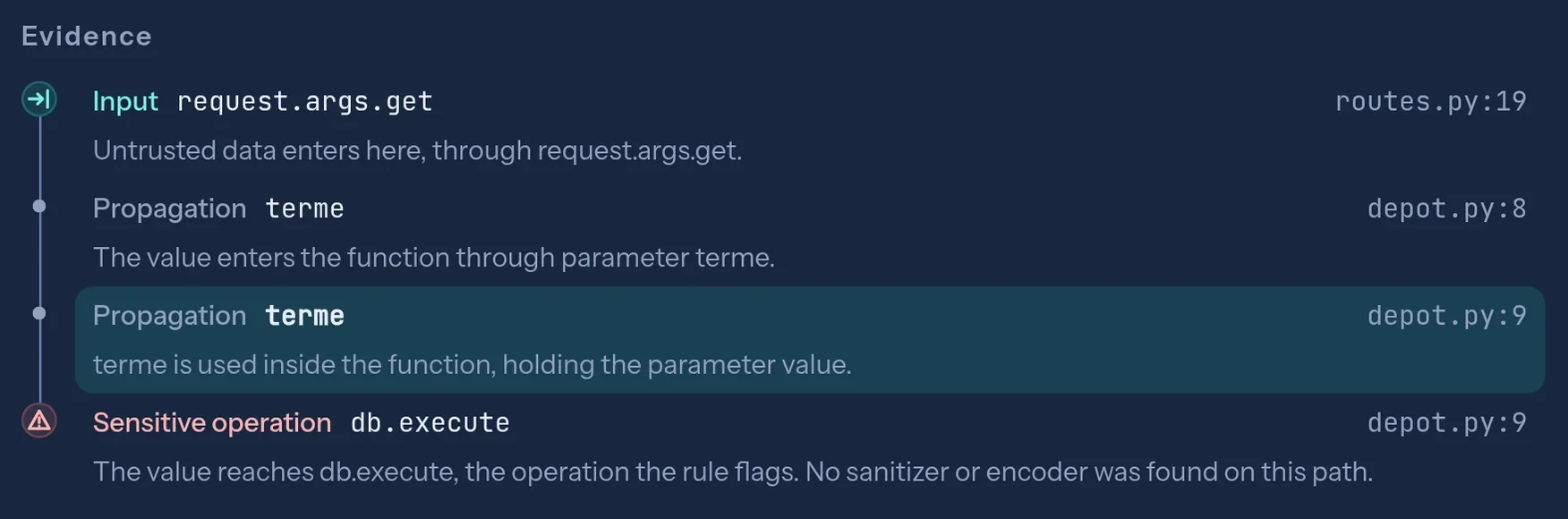
routes.py to db.execute in depot.py, through the terme parameter. That is L5.The hard part is the map itself. Here, the call is direct; in a real application, it often goes through indirect mechanisms, where the function actually called is only known at runtime. How each tool guesses "who calls whom" explains a large share of the differences between tools.
Configuration 4: a sanitizer is only valid for its context
4 flaws of 41 false alert
A protection is valid only for its intended uses and assumptions:
| Sanitizer | Protects | Does not protect |
|---|---|---|
html.escape | Text displayed in an HTMLHTML: the language that describes the content of web pages page | A file path such as ../../etc/passwd |
| Parameterized query | An SQL query | A command sent to the server |
| Resolved-path check | Opening a file, if the resolved path stays inside the allowed folder (symlinks and concurrent access included) | An SQL query |
../../etc/passwd climbs up the server's folders to a sensitive file, and html.escape lets it through. To find L3 again, the tool must tie each sanitizer to the type of operation it protects.
Remember:a tool that misses L3 reports nothing, and nothing looks more like safe code than a missed vulnerability. It is one of the clearest gaps between tools, and one of the hardest to see in a demo.
Configuration 5: understanding the developer's checks
4 flaws of 40 false alerts
L4 is safe: the value of sort is checked against a list of allowed values before reaching the query. To stay silent, the tool must understand that the abort(400) line, which sends an error back to the visitor, cuts the path, and that the value reaching the query can only be name or price.
This configuration recognizes the check in our example. Real checks take many forms: checks against a text pattern, conversion to a number, functions written by the team. An honest tool lets you declare your own sanitizers and mark an alert as false, while keeping a written record of the decision.
Under the hood: from text to graph
A SAST tool does not read code the way you read this article. It first turns it into a series of representations, each able to answer a different question. Take five lines:
def search():
    q = request.args.get("q")
    if not q:
        q = "coffee"
return db.execute("SELECT * FROM products WHERE name = '" + q + "'")- AST
The syntax tree is the grammar:
db.execute(…)is a call, whose argument is a concatenation of three pieces. Configuration 1 pattern rules work here, without knowing whereqcomes from. - CFG
The control flow graph is the possible order of execution: after the
if, two paths split and join again. Eitherqcomes from the address, or it is “coffee”. - SSA
SSA form (Static Single Assignment) gives every assignment a fresh name:
q₁ = request.args.get("q"),q₂ = "coffee", and where the paths join,q₃ = φ(q₁, q₂), “one or the other depending on the path taken”. A φ that mixes ink and clear water gives ink: alert. - Calls
The call graph links functions together, from one file to another. It is what lets configuration 3 find L5.
Joern takes the idea all the way: it overlays the tree, the control flow and the data dependencies into a single graph, the code property graph (Yamaguchi and co-authors, 2014). Finding a taint flaw then means finding a path in that graph, from source to sink, that crosses no sanitizer. The richer the representation, the further the tool sees, and the more it costs in memory and time.
Taint, the long version
A taint engine needs four lists, and their quality matters as much as the engine itself:
| List | Role | Python examples |
|---|---|---|
| Sources | Where the ink appears | request.args, request.form, headers, cookies, uploaded files |
| Sinks | Where the ink becomes dangerous | cursor.execute, subprocess.run(…, shell=True), open, pickle.loads, render_template_string |
| Sanitizers | Where the ink stops, for a given sink | SQL query parameters (safe for that call, without “washing” the value for later), int(), shlex.quote for a POSIX shell argument |
| Propagators | Where the ink moves from one value to another | +, f-strings, .format, " ".join, list.append, dict.get |
Propagators are the forgotten ones: if the tool does not know that " ".join(pieces) carries the ink from the list to the text, the path stops dead, and the flaw vanishes from the report without a sound.
Then come the sensitivities: what the engine agrees to tell apart. Each one removes false alarms, and each one has a price.
Flow: order matters
x = request.args["x"]
x = "fixed"
db.execute(x)
A flow-insensitive engine sees “x was tainted at some point” and alerts. Wrongly: at the time of the call, x is “fixed”.
Fields: an object is not a block
u.name = request.args["n"]
u.role = "customer"
db.execute("… " + u.role)
Without field sensitivity, all of u is tainted, u.role included. False alarm.
Context: the caller matters
a = clean(request.args["q"])
b = clean("SELECT 1")
db.execute(b)
An engine that merges every call to clean concludes that its return is tainted, including for b. A summary saying “the return is tainted if the parameter is” solves it.
Paths: guards matter
if sort not in ("name", "price"):
    abort(400)
db.execute(f"… ORDER BY {sort}")
That is L4, the configuration 5 trap: after the abort, sort can only be one of two constants.
For the curious: the theory behind summaries
Modern engines compute function summaries, then start again until nothing changes any more (a fixed point). The classic theory, IFDS (Reps, Horwitz and Sagiv, 1995), reduces the problem to reachability in a graph: can you get from the source to the sink while matching calls with their returns?
Key takeaway:“we do taint analysis” means almost nothing. Ask which of these sensitivities the tool handles, and which lists it relies on for your frameworks.
Why no SAST tool is perfect (and never will be)
This is not a lack of talent on the vendors' side, it is mathematics.
Rice's theorem (1953) says that no program can decide, for every program, a non-trivial property of its behaviour. “Can this program send an input into an SQL query?” is one.
So every tool has to choose which way to be wrong:
Over-approximate
- PrincipleFlag everything that could happen.
- PriceFalse positives.
Under-approximate
- PrincipleOnly flag what you are sure you saw.
- PriceFalse negatives.
In practice, industrial tools mix both depending on the spot. Researchers even coined a word for it, soundiness (“In Defense of Soundiness”, Livshits and co-authors, 2015): rigorous everywhere, except where rigour would cost too much, for example around eval or reflection.
Key takeaway:a SAST tool guaranteed correct for all programs and their behaviours would solve the halting problem. If its vendor really had one, they would not be on a trade show stand, they would be collecting the Turing Award.
What breaks tools in real life
Our booby-trapped application fits in three tidy files. Real code is full of things that make the tool lose track of the ink:
- Frameworks.In Flask, inputs are called
request.args; in Django,request.GET; in Spring, a parameter annotated@RequestParam. Without a model of the framework, the tool does not even know where the sources are: framework models are the real product. - Dependency injection.In Spring, the object actually called is chosen at startup, from configuration. The call graph is then guessed, not read.
- Reflection and dynamic code.
getattr(obj, name)(),eval, computed imports, decorators that wrap a function: all calls whose target can be hard, or impossible, to work out without running the code. - ORMs and templates.
Product.objects.filter(name=q)is parameterized;Product.objects.raw("…" + q)is not. Jinja2, in Flask, escapes HTML by default in.htmltemplates, but a|safeor aMarkup()switches that protection off. The tool has to know every variant. - What it does not read.Generated or minified code, an unsupported language, a file that is too big, syntax too recent for the parser: often, the tool moves on silently.
Language models help read a path (in 2024, Google's Big Sleep found a memory flaw in SQLite before release), but they can invent a protection: a “false positive” verdict without proof is worth nothing. The right split: the engine provides the path, the AI helps read it, a human decides, and the decision is written down.
Wrapping up
Three tools, three lists: the gap does not come from the number of alerts, but from what each engine can model (the path from one file to another, the context of a sanitizer, the developer's checks) and from what it admits it did not read. None will ever be perfect, Rice sees to that. Prefer the one that shows the full path of every alert and says clearly where it stopped: how many files were analyzed, how many were skipped, and why.
Words from this article · 11 words
- Precision
- The share of a tool's alerts that are real flaws.
- Recall
- The share of real flaws a tool finds.
- Pattern
- A code shape searched for as is, without knowing where values come from.
- Taint
- Tracking data from the input to the dangerous operation.
- Call graph
- The map of "who calls whom" in a program.
- Function summary
- A card saying what a function does with the data it receives.
- Sanitizer
- What makes data safe for one specific type of operation.
- OWASP
- A non-profit foundation that publishes application security resources.
- AST, CFG, SSA
- The syntax tree, the control flow graph, and the form where every assignment has a unique name.
- Sensitivity
- What an engine agrees to tell apart: the order of statements, an object's fields, the calling context, paths.
- Propagator
- An operation that carries the ink from one value to another, such as a concatenation.
To choose a tool (market engines, benchmarks, questions to ask): Choosing a SAST tool without being fooled. To revisit the basics: SAST explained simply. And for the blocks your code imports: SCA: from inventory to priority.
Read next: Choosing a SAST tool without being fooled